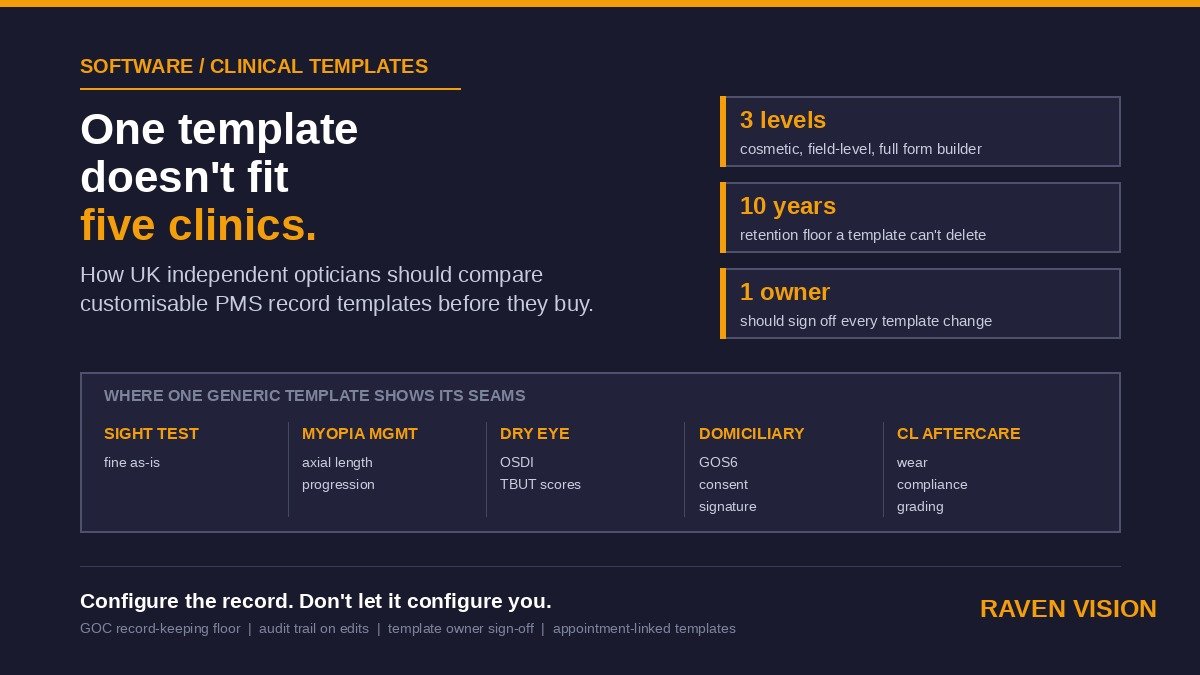

Every practice management demo starts the same way. The salesperson pulls up a sight test template, walks through the fields, and it looks great — clean layout, sensible tab order, all the boxes you’d expect. Then you get the system home and try to run your dry eye clinic through it, or your myopia management reviews, or a domiciliary visit where half the fields on screen don’t apply and the two you actually need aren’t there. That’s the moment “customisable” stops being a tick-box on a features page and starts being the thing that decides whether your team fights the software every day or the software gets out of the way.
This one’s for owners and managers comparing systems on template and record customisation specifically — not the general “does it have an EMR” question, which we covered in our piece on comparing clinical modules across UK optician PMS. This is narrower: once a system has clinical records at all, how much can you actually shape them to fit the services you run, who’s allowed to do the shaping, and what breaks when you do.
What “customisable” actually means — and the three levels vendors blur together
Ask any vendor if their software is customisable and the answer is yes. Ask what that means and you get three very different products hiding behind one word.
The first level is cosmetic: you can rename a field, reorder a panel, hide a column you don’t use. Useful, but it’s decoration. It doesn’t change what the software captures or how, and it won’t help you build a dry eye workup that doesn’t exist as a template in the first place.
The second level is field-level configuration. You can add a new field to an existing template — a symptom score, a contact lens wear time, a compliance flag — and it appears where you put it, gets saved with the record, and shows up in future visits. This is the level most systems that claim customisation actually deliver, and it covers a surprising amount of ground. Most specialism clinics don’t need a bespoke workflow; they need three or four extra fields bolted onto the standard consultation template.
The third level is a genuine template or form builder: new templates from scratch, conditional logic (show this field only if that one’s ticked), and templates that can be assigned to specific appointment types so the myopia management review pulls up different fields to the routine sight test automatically. Very few UK optician systems do this properly, and the ones that do usually gate it behind a higher tier or a setup fee. Know which level you’re being sold before you sign — the word “customisable” on a features page doesn’t tell you.
Why one template doesn’t fit every service line
If your practice only ever runs standard NHS and private sight tests, template flexibility barely matters — the built-in template was written for exactly that. It starts mattering the moment you run a second kind of clinic.
Myopia management
Axial length, cycloplegic refraction where used, lens or ortho-k fitting notes, a progression chart that means something to a parent, and a review interval that isn’t the standard twelve months. Force this into a generic consultation template and you end up with axial length buried in a free-text box that nobody searches later — which defeats the point of tracking progression at all.
Dry eye clinics
OSDI or SPEED scores, meibomian gland assessment, tear break-up time, a treatment ladder that changes visit to visit. This is a service line built almost entirely on structured, repeatable measurements you want to trend over time, not prose. A system that can’t hold that structure turns your dry eye clinic into a diary of paragraphs.
Domiciliary visits
Different consent wording, a GOS6 or PVN reference instead of a standard NHS voucher, mobility and carer-present flags, sometimes a signature captured on a tablet rather than at a desk. None of this belongs on the in-practice template, and bolting it on clutters every single routine test with fields that don’t apply to it.
Contact lens aftercare
Wear schedule, solution used, compliance and comfort scores, slit lamp findings against a standard grading scale. Distinct enough from a standard sight test that most systems ship a separate CL template out of the box — which is itself a reasonable proof that one-size-fits-all doesn’t hold even for the basics.
None of this is exotic. It’s the ordinary range of services a UK independent practice runs to build a mix beyond routine testing and dispensing. The question for a PMS comparison isn’t whether the software has “an EMR” — it’s whether it can hold four or five different shapes of clinical record without every one of them turning into a free-text dumping ground.
The compliance floor — what you can’t configure away
Customisation has a ceiling set by what the College of Optometrists and the GOC expect a clinical record to contain, and it’s worth being clear about that before you get excited about a form builder. Structured recording of visual acuity, refraction, intraocular pressure where measured, and anything referred needs to be present and retrievable — not necessarily on one specific screen, but somewhere a record request or an indemnity claim can find it. Retention runs to ten years after the patient was last seen, or to age twenty-five if that’s later for a child. A customisation feature that lets you delete a field from every past record, rather than simply stop showing it on future ones, is a liability generator, not a convenience.
The other compliance question is more practical: who can edit a template, and is that edit logged? If a receptionist or a junior optometrist can quietly remove a field from the sight test template on a quiet Tuesday afternoon, you want a system that tells you it happened, when, and by whom — the same audit-trail expectation that applies to the clinical record itself should apply to the shape of the clinical record too. Ask this directly in a demo. Most vendors haven’t thought about it, and the ones who have will tell you plainly rather than dodge it.
Five things to check before you sign
1. Who’s actually allowed to build or edit a template
Is it you, from a settings screen, or does every change go through the vendor’s support desk as a ticket with a turnaround time? Both are legitimate models. The vendor-managed version is safer against accidental damage; the self-service version is faster when you want to add a field this week rather than next month. Know which one you’re buying and price the difference — a support ticket every time you tweak a template adds up over a year.
2. What happens to historical records when a template changes
Add a field going forward, and past records simply don’t have it — fine, expected. But ask specifically what happens if a field is renamed or removed: does the old data stay attached to the record under its original label, or does it vanish from view? You want the former. A system that quietly drops historical data because a template moved on is not one you want holding ten years of clinical history.
3. Whether it’s a real builder or a settings panel with a generous name
Ask to see the template editor live, not in a slide. Add a field yourself if they’ll let you. Five minutes at the keyboard tells you more than any brochure claim about “unlimited customisation.”
4. Whether templates can be tied to appointment type
A myopia management template that only appears when someone books a myopia management appointment is genuinely useful — it removes the step where staff have to remember to select the right template manually, which is exactly the kind of thing that gets skipped on a busy Saturday.
5. The real cost of change
Free, included, chargeable per change, or locked behind a higher tier — get this in writing before you sign, not after you’ve hit the limit. A system with brilliant template flexibility that charges £150 every time you want to add a field isn’t flexible in any way that matters to your budget.
The maintenance tax nobody mentions
Here’s the bit that gets left out of every sales conversation about customisation: flexibility has a cost even when it’s free. Give five clinicians the ability to build their own templates and within a year you’ll have eleven near-identical dry eye templates, three of which are subtly wrong, and nobody quite remembers which one is the “proper” version. Full self-service template building without any governance is how practices end up with worse data quality than a rigid off-the-shelf system, not better.
The fix isn’t less customisation — it’s ownership. One person, usually the practice owner or clinical lead, should sign off on any new or changed template before it goes live for the whole team. That’s a two-minute conversation, not a committee, but it needs to happen somewhere, and the system should make it easy to see who last touched a template and when.
Where Raven Vision sits on this
We’ll be straight about it, because this is a comparison post and you’d expect nothing less. Raven Vision’s customisable clinical templates sit at the second level described above and reach into the third for the fields most UK independents actually ask for: you can add, relabel and reorder fields on any consultation type yourself, from within the clinical record, and templates can be tied to appointment type so your myopia review pulls the right fields automatically. Every template edit is logged against the user who made it, and removed fields stay attached to the historical records that used them — nothing vanishes from a past visit because today’s template moved on. It’s included in the standard £149 a month, no separate module fee.
Where we haven’t built the full form-builder level — conditional branching logic, for instance, where one field’s answer changes what appears next — we’ll say so rather than imply it with a features page bullet point. If your practice genuinely needs that level of complexity, ask us directly; it’s worth a real conversation rather than a guess from a brochure, and the honest answer might be that a simpler configuration change gets you there without the complexity anyway.
If you’re partway through a PMS comparison, the most useful next step is a practical one: bring your own dry eye or myopia management workflow to a demo and ask the vendor to build the template with you, live, on the call. Watch how long it takes and who’s allowed to do it in your own practice afterwards. That tells you more in fifteen minutes than any features page will. Book a demo and we’ll do exactly that with your own clinic list — full detail on what’s included is on the pricing page.