
Most PMS demos spend forty minutes on the diary and the clinical record and about four on dispensing. Which is odd, because the dispensing screen is where the practice actually gets paid. The sight test is the cost centre. The pair of glasses that follows it is the revenue. If your software makes that handover clumsy, every other feature is polishing the wrong end of the practice.
This one’s for owners and managers comparing practice management systems, or quietly wondering whether the one they’ve got is holding the dispensing side back. We’ll walk through what a dispensing module has to do, the four ways vendors handle lab ordering, the demo questions that separate a real module from a glorified order form, and where Raven Vision sits. We’ve written before about tracking spectacle orders once they’ve gone to the lab and about lifting your dispense rate. This is the software layer underneath both.
Why the dispensing module gets ignored in the buying process
Three reasons, in our experience.
First, the person running the buying decision is usually the optometrist owner, and the optometrist owner spends most of their day in the consulting room. The diary and the record are their world. The dispensing bench belongs to someone else.
Second, dispensing looks simple from the outside. Frame, lens, price, order. How hard can it be? Then you watch a DO re-key a prescription from one screen into another, look up a lens code in a supplier catalogue that’s two versions out of date, phone the lab to check a stock fitting, and write the collection promise on a Post-it. It isn’t simple. It’s a dozen small hand-offs, and each one is a chance to lose time, margin or the sale.
Third, vendors don’t lead with it because it’s hard to demo well. A slick diary looks good on a screen share. A dispensing flow only looks good when it copes with real cases: the −7.50 with prism, the rimless remake, the patient who wants their own frame reglazed, the NHS voucher plus a private upgrade. Nobody puts those in a sales demo unless you make them.
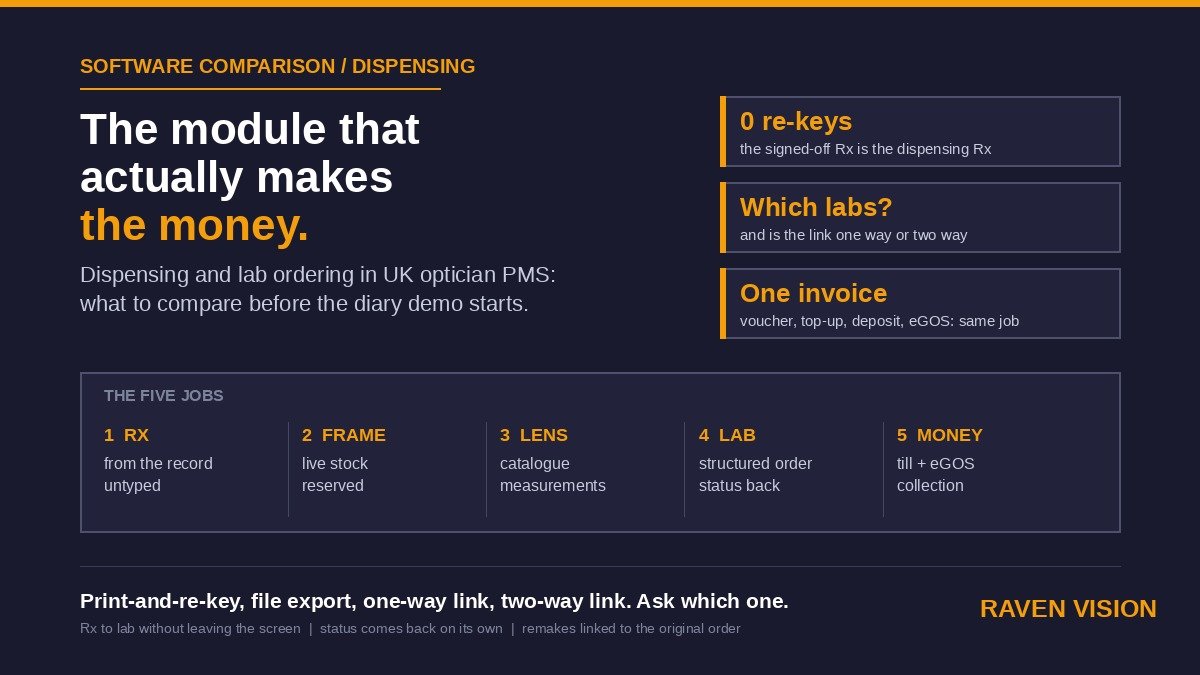
The five jobs a dispensing module has to do
Strip away the feature lists and there are five jobs. If a system does all five without leaving the screen, it’s a dispensing module. If it does two and expects your team to do the rest in a lab portal and a spreadsheet, it’s a quote builder with ambitions.
1. Take the prescription from the record without anyone typing it
The Rx the optometrist signed off in the consulting room should be the Rx on the dispensing screen. Same numbers, same visit, no retyping. That sounds obvious, and yet plenty of systems still treat clinical and dispensing as two databases that happen to share a patient name. Every re-key is a transposition error waiting to happen, and transposition errors turn into remakes, and remakes turn into the remake rate you’re trying to cut.
Ask to see it. Open a test patient, sign off a prescription in the clinical record, then go to dispense. If the Rx isn’t already sitting there, that’s your answer.
2. Pick the frame from live stock, not from memory
The frame on the patient’s face should be a scannable item in your stock system, with its cost, retail price, supplier and size already known. The dispense should reserve it, or mark it for reorder if it’s a display sample and you’re sending the patient’s own away to be glazed. When the sale completes, stock moves. When it’s cancelled, stock comes back.
What goes wrong here is usually the opposite: the practice has a stock module and a dispensing module and neither knows about the other. So the frame gets sold, stays “in stock” on the report, the reorder never triggers, and six weeks later someone’s explaining to a patient why the frame they saw on the wall isn’t available any more.
3. Build the lens spec with the supplier’s actual catalogue
Lens selection is where the money is made or quietly given away. A proper module holds current supplier catalogues (or at least your practice’s own curated ranges) with the design, material, index, coatings and add-ons priced up, so the DO is choosing from a list rather than hunting through a PDF. It should handle a price ladder, not just a price: good, better, best at a glance, with your margin visible to staff and not to the patient.
Then the measurements. PDs, heights, back vertex distance, pantoscopic tilt, wrap where the lens needs it. Those should have fields, with sensible validation, so that a missing height on a varifocal order gets caught at the bench and not at the lab.
4. Send the order to the lab, and know what happened to it
This is the job that separates the systems, and it’s the one we’ll spend the next section on. For now, the principle: the order that leaves the practice should be the same structured data that’s on the dispensing record, and the practice should be able to see the order’s status without phoning anyone.
5. Take the money and close the loop
Deposit, balance, NHS voucher value, private top-up, plan discount, any of it. The till and invoicing should sit on the same record as the dispense, so the outstanding balance is obvious at collection and the eGOS claim is drawn from the same job rather than rebuilt by hand. When the glasses are collected, the job closes, the collection date is on the record, and the recall for next time is already set.
The four ways vendors actually handle lab ordering
Every PMS on the UK market will tell you it “supports lab ordering”. Here’s what that phrase can mean, from worst to best.
Print and re-key
The system produces an order sheet. Someone takes it to the lab’s web portal, or emails it, or reads it down the phone, and keys it in again. Status comes back by email or by ringing the lab. This is where a surprising number of independents still are, sometimes with a modern-looking PMS on the front. It works. It’s just slow, and every re-key is a new error surface.
Export a file
The PMS spits out a structured order file (or an email in a format the lab has agreed to accept) and the lab imports it. Better: no re-keying at the practice end. But it’s one way. You don’t find out the lens is on back order until someone at the lab notices and tells you, and the tracking still lives outside your system.
Direct electronic link, one way
The order goes from your dispensing screen straight into the lab’s system, with structured fields: Rx, lens code, frame trace or size data, measurements, special instructions. The lab validates it on receipt, so a missing height bounces immediately instead of three days later. Status updates, though, still mean logging into the lab portal or waiting for the email.
Direct electronic link, two way
Order goes out, status comes back. Received, in production, on hold (with a reason), dispatched, tracking number. The dispensing record updates itself, the order board on the front desk updates itself, and the patient can be told the truth when they ring on day six. This is what good looks like in 2026, and it’s the standard you should be asking vendors about, lab by lab.
The catch: a two-way link only exists for the labs the vendor has built one with. A system with brilliant integration to three labs you don’t use is a print-and-re-key system for the two you do. So the question is never “do you integrate with labs?”. It’s “which labs, and how deep?”.
The demo questions that expose a weak module
Bring these to every walkthrough. Bring a real DO too, because they’ll spot things the owner won’t.
Show me a full dispense from a signed-off Rx to a lab order, without leaving the screen. Time it. If it involves a second application, a browser tab or a printout, count that as a step.
Which labs do you have a direct electronic link with today, and is it one way or two way? Get the list in writing. “We can integrate with any lab” means there’s a file export and a hope.
What happens when the lab puts an order on hold? Where does that appear? Who gets told? If the answer is “the lab emails you”, the status isn’t in your system.
Do a reglaze on the patient’s own frame. Plenty of systems assume every job starts with a frame from stock and fall over when it doesn’t.
Do an NHS voucher with a private upgrade. Voucher value, upgrade cost, deposit and balance should all land on the same invoice and the eGOS claim should draw from the same job.
Dispense a second pair with a plan discount applied. The discount should come from the patient’s plan status, not from a DO remembering to knock it off.
Show me the remake flow. A remake should link to the original order, carry a reason code, and show up in a report. If remakes are just new orders, you’ll never know your remake rate or why it’s what it is.
Show me your supplier catalogue and tell me who updates it. If it’s the practice’s job to load lens prices, ask how long the last update took them.
Show me the order board. Every open job, its status, its promised date, and which ones are late. On one screen. If the desk can’t see it, the desk will build a spreadsheet, and now you’ve got two systems again.
What does it cost? Some vendors charge per lab link, per order, or bundle dispensing into a higher tier. Ask for the all-in monthly figure for your practice with your labs.
Red flags
A few things that should slow you right down.
The Rx has to be typed into the dispensing screen. No amount of lab integration makes up for that, because you’ve put the error at the very start of the chain.
Stock and dispensing are separate modules that “sync overnight”. Overnight is too late for a frame that’s just been sold twice.
The vendor can’t name the labs. Or names labs you’ve never heard of because the product was built for another market.
Measurements are a free-text box. Varifocal heights in a notes field is how remakes happen.
The remake button creates a fresh order with no link to the original. You lose the reason, the cost and the pattern.
What this costs you when it’s wrong
Rough numbers, because your own will be better. Say your practice dispenses 120 pairs a month. If the current flow adds five minutes of re-keying, chasing or double-handling per job, that’s ten hours of DO or desk time a month. At what you pay a qualified dispensing optician, that’s not trivial, and it’s ten hours they’re not spending in front of a patient.
Then remakes. If a quarter of your remakes come from data errors between the record, the dispense and the lab (which is roughly what practices tell us when they finally track it), and each remake costs you the lens cost plus the second collection visit plus a slightly less delighted patient, then a system that removes the re-keying pays for itself before you’ve counted anything else.
And then the sale you don’t lose. A DO who can build a priced good-better-best in thirty seconds, with the frame reserved and the collection date promised, closes more dispenses than one who says “I’ll work it out and call you”. We wrote about that in the dispense rate post. The software doesn’t do the selling. It just stops getting in the way.
Where Raven Vision sits
Honest position. Raven Vision was built inside our co-founder Shaukat’s own practices, and those practices live or die on dispensing like everyone else’s. So the dispense starts from the signed-off Rx in the patient record with nothing retyped, the frame comes from live stock that moves when the sale completes, supplier orders are tracked from placement to delivery on the same record, and deposit, balance, NHS voucher and private top-up all sit on the one invoice with the eGOS claim drawn from the same job. It’s all in the one £149 a month subscription. No dispensing tier, no per-order fee.
What we’d say against ourselves: lab links are only as good as the labs they cover, and that’s true for us as much as anyone. Bring your lab list to a walkthrough and we’ll tell you, lab by lab, exactly what the link does today and what it doesn’t. If you’re on a lab we don’t have a two-way connection with yet, we’d rather say so in the demo than have you find out after migration. And if your dispensing is already running smoothly on your current system, the honest question is whether the rest of the practice is, not whether to move for this module alone.
What to do this week
Pull your last twenty spectacle orders. For each one, count how many times the prescription was typed by a human, how many systems the order touched between the chair and the lab, and how you found out it had arrived. Then ask your DO which of those steps they’d drop tomorrow if they could.
That list is your dispensing module spec. Take it into every demo you sit through, and don’t let a vendor spend forty minutes on the diary before they’ve shown you a full dispense with your labs.
Want to see it with your own lab list? Book a walkthrough, or look at what’s included at £149 a month. Three months free, migration included, no long contract.