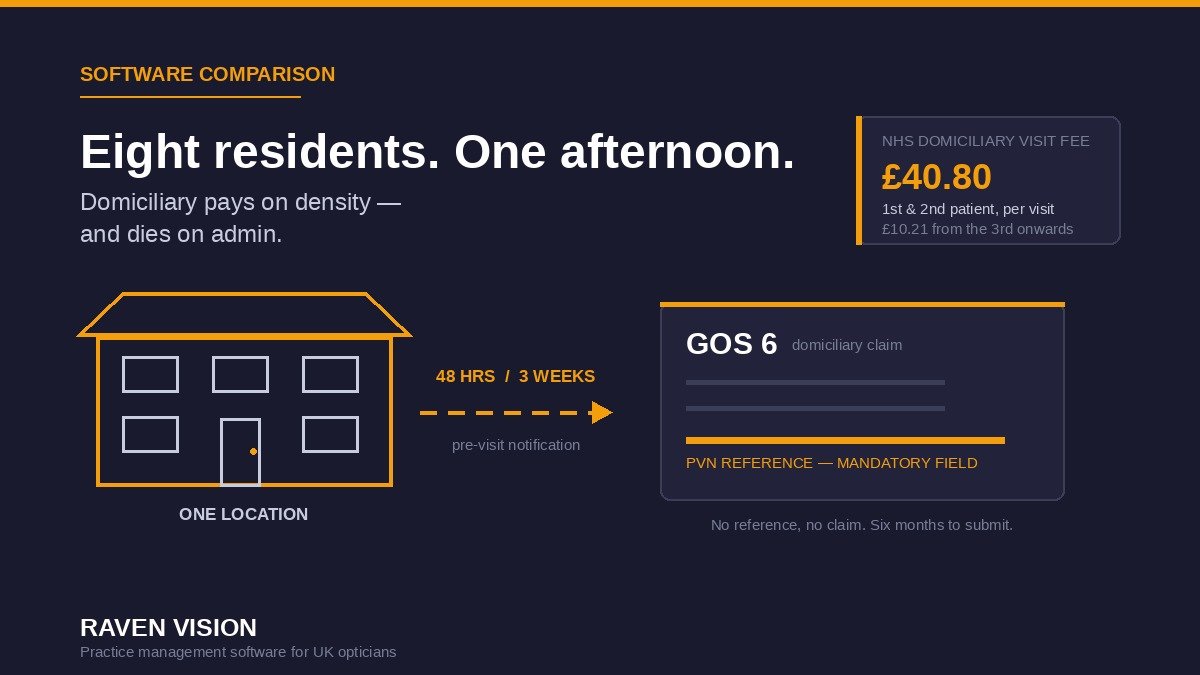

Most independents look at domiciliary the same way. There’s a care home ten minutes away with forty residents, half of whom haven’t had a sight test in years. The clinical need is obvious, the fees are decent, and the local competition is usually a national provider who visits twice a year. It looks like free money.
Then you actually try to run it, and you discover that domiciliary isn’t a different kind of appointment. It’s a different kind of business — with its own notification rules, its own claim form, its own eligibility test and its own way of going wrong. And almost none of it fits neatly into practice management software that was designed around a diary in a shop.
If you’re thinking about taking the sight test on the road, or you’re already doing a few visits and the admin is quietly eating the margin, here’s what your system needs to handle — and what to test before you commit.
Why domiciliary is worth a serious look in 2026
The economics of NHS work in practice are well known and not improving. The GOS1 sight test fee in England rose 2.5% to £24.13, with essentially everything else frozen — an increase the profession’s bodies were fairly blunt about calling a real-terms cut. If your whole model rests on that fee, you’re in a squeeze.
Domiciliary changes the arithmetic, because there’s an additional visiting fee on top. In England that’s £40.80 for the first and second patient seen at one visit, and £10.21 for the third and each subsequent patient at the same premises.
Which means density is the entire game:
| One visit | Sight test fees | Visiting fees | Total | Per patient |
|---|---|---|---|---|
| 1 patient at home | £24.13 | £40.80 | £64.93 | £64.93 |
| 2 patients, same address | £48.26 | £81.60 | £129.86 | £64.93 |
| 8 residents, one care home | £193.04 | £142.86 | £335.90 | £41.99 |
Before any dispensing. NHS figures, ex-dispensing, England rates.
Look at the last row properly. Eight residents in one afternoon is £335.90 of GOS income from a single trip, and the dispensing that follows is often the larger number. A single-patient home visit, meanwhile, pays £64.93 for a round trip that might take ninety minutes door to door. The difference between domiciliary being profitable and being a favour you do for a former patient is almost entirely about how well you batch, plan and follow through — which is to say, it’s an admin problem, and admin problems are software problems.
The compliance layer no shop-floor system was built for
Three rules catch people out, and all three have software implications.
The pre-visit notification is a hard gate
You can’t just turn up. In England you have to notify the commissioner in advance through the PVN process, and the notice period depends on numbers: 48 hours if you’re seeing one or two people at the same address, three weeks if you’re seeing three or more.
Changes to a notification generally need to be made at least 48 hours before the visit. Up to three additions or substitutions are permitted on the day itself, but only where it genuinely wasn’t possible to give 48 hours’ notice — a new resident, or someone whose vision has just changed. And if your original notification gave between 48 hours and three weeks’ notice for a single patient, you can add one more.
Then the crucial bit: you get a PVN reference back, and that reference is a mandatory field on the GOS6 claim. No reference, no claim. So the notification isn’t paperwork you do afterwards — it’s a dependency that sits three weeks ahead of the clinical work, and if your system has nowhere to store it, someone is keeping it in an email folder and you will eventually lose one.
“Housebound” is not a reason
Eligibility for a domiciliary sight test is that the patient is unable to leave home unaccompanied because of physical or mental illness or disability. The guidance is specific about how you record it: you need the actual condition that prevents attendance, noted on the form. Generic entries — housebound, immobile, wheelchair-bound, resident of a home — are not sufficient.
That’s a direct software requirement. A tickbox marked “domiciliary” doesn’t satisfy it. You need a mandatory free-text field, attached to the patient record, that carries a specific clinical reason through to the claim. If your PMS can’t do custom mandatory fields, your team will default to typing “housebound” because it’s quick, and you’ll have a compliance problem sitting in several hundred records.
Six months, and the clock starts at the test
GOS6 forms have to be submitted within six months of the sight test to be paid. In a shop that’s rarely an issue because claiming is part of the daily rhythm. On the road it absolutely is, because the visit happens on Tuesday, the paperwork comes back in a bag, and it gets done “when there’s time”. An open-claims list you can filter by age is the difference between getting paid and donating your afternoon. We’ve written separately about cutting GOS claim rejections, and every one of those habits matters more when the clinician isn’t in the building.
The six things domiciliary software actually has to do
1. Plan a visit, not an appointment
A domiciliary session is one clinician, one location, one date, and several patients — with a PVN reference, a notice deadline and a travel window attached to the whole thing rather than to any individual.
Most optical diaries can’t model that. They’ll let you book eight consecutive slots and call it a day, which works until you need to know which PVN covers which patients, or you need to substitute a resident who’s in hospital. Ask to see a visit as a container: one record holding the location, the date, the notification reference and the patient list, with individual clinical records hanging off it. If the diary can only think in individual appointments, someone will be maintaining a parallel spreadsheet within a month.
2. Work when the connection doesn’t
Care homes are famously bad for signal. So are the sort of houses where your patients live. Any system you take out of the building needs a clear, honest answer to what happens when the connection drops mid-examination — genuine offline capture with sync on return, or a documented workflow for recording on paper and entering afterwards.
The wrong answer is a vague one. Push for specifics, and get them to show you rather than describe it. This overlaps heavily with tablet and mobile access generally, but domiciliary is where it stops being a convenience and starts being the job.
3. Carry the right record to the door
Domiciliary patients are, almost by definition, complex. Older, often on multiple medications, frequently with cataract, AMD or diabetic changes already in the notes, sometimes with dementia. The clinician needs the full history at the bedside — previous Rx, drawings, images, medication, who holds power of attorney, which family member to ring — not a stripped-down mobile view with the useful fields missing.
Test this specifically: open a genuinely complicated patient record on the device you’d actually carry, and see what’s missing compared with the desktop.
4. Handle consent and capacity properly
Under the Mental Capacity Act, capacity is assumed unless established otherwise, and it’s assessed decision by decision at the time the decision is needed — not as a blanket judgement about a person. In domiciliary work you’ll meet patients where this genuinely applies, and you need somewhere structured to record the assessment you made, who was present, and on what basis you proceeded.
“Add a clinical note” is not really an answer. Structured, searchable, auditable is the answer, because the value only appears when someone asks about it eighteen months later.
5. Turn the visit into a dispense, not a to-do list
The sight test is often the smaller half. You’ve got frames in a case, no till, no workshop, and a patient who can’t come in for a collection or an adjustment. So the system has to let you take an order at the bedside, commit that frame out of stock, take payment or record a voucher against the account, and then track a delivery-and-fit visit as its own scheduled job.
If any of those steps lives outside the software, that’s the step that will fail. Uncollected spectacles are irritating in a practice; undelivered spectacles in a care home are a clinical and reputational problem, because the patient can’t chase you.
6. Recall people who can’t come back
Standard recall assumes the patient responds and books. Domiciliary recall doesn’t work that way — you’re recalling a location as much as a person, and the trigger you actually need is “which residents at Elmwood House are due in the next quarter, so I can build one visit and one notification around them”.
That’s a segmentation question. Can you filter recall by site or address group, not just by date? Can you flag that correspondence goes to a relative or the home manager rather than the patient? Get this right and domiciliary becomes a repeating, plannable cycle instead of a series of one-offs.
Ten questions for the demo
- Show me a domiciliary visit as a single record with multiple patients attached.
- Where does the PVN reference live, and does it flow automatically onto the GOS6?
- Can I make the eligibility reason a mandatory free-text field, and is it visible on the claim?
- What happens if the connection drops during an examination?
- Show me the full clinical record on a tablet — what’s missing versus desktop?
- Can I record a capacity assessment and consent in a structured, searchable way?
- Can I take an order and payment at the bedside, and does it reduce stock correctly?
- How do I schedule and track a delivery-and-fitting visit?
- Can I filter recall by address or care home rather than only by due date?
- Show me an open GOS6 list sorted by age, so I can see what’s near the six-month limit.
Five red flags
- Domiciliary sold as a paid add-on module. Ask the price before you get attached to the idea, and add it to the monthly figure you’re comparing.
- No home for the PVN reference. If it’s not a field, it’s in someone’s inbox, and one day it won’t be.
- A domiciliary tickbox with no reason field. That’s a system encouraging you to record something that doesn’t meet the guidance.
- A cut-down mobile view. Fine for looking things up, not fine for examining a complex patient in a chair in a lounge.
- Vagueness about offline behaviour. Vendors who’ve done domiciliary properly answer this crisply. Vendors who haven’t, don’t.
What good looks like
A domiciliary setup that works looks roughly like this. Visits planned as visits, with the location, date, notification and patient list held together. The PVN reference captured once and carried through to every GOS6 it covers. A mandatory, specific eligibility reason on each record. Full clinical records available on the device you carry, with a sane answer for poor signal. Orders, payments and vouchers taken at the bedside and reflected in stock and billing immediately. Delivery visits scheduled rather than remembered. Recall segmented by location. And an open-claims view that makes the six-month deadline impossible to miss.
Get that and domiciliary becomes what it should be: a predictable quarterly cycle around a handful of homes, serving patients who genuinely can’t get to you, at a per-visit yield that beats most of what you do in the shop. Get it wrong and it becomes the thing you keep meaning to sort out.
How Raven Vision fits
Raven Vision was built inside working practices before it was sold to anyone. Shaukat, our co-founder, is an optometrist with more than 35 years in the profession, a former University of Manchester optics lecturer, and he still runs three practices — so the features exist because they were needed on a Tuesday, not because they filled a gap on a comparison grid.
For domiciliary specifically, the building blocks matter more than any badge. It’s cloud-based, so the same full system runs on a tablet at a bedside as on the desktop at reception — not a reduced mobile app. Clinical fields are customisable, so you can make a specific eligibility reason mandatory rather than hoping people type something useful. eGOS claiming is built in rather than bolted on, so claims don’t drift into a pile. Recall is segmentable. Stock, orders and billing sit in the same flow as the clinical record, so a bedside dispense behaves like any other dispense.
It’s £149 per month per location, and that’s the whole system — records, appointments, EMR, stock, eGOS, billing and recall — not a core product with modules priced on top. Data migration is free, onboarding is done by Shaukat personally, and there’s no lock-in contract.
If domiciliary is a real part of your plan, the honest advice is to walk your actual workflow through any system you’re considering, ours included, rather than trusting a feature list. It’s a niche with enough regulatory edges that generic answers don’t survive contact with a care home.
Before you start
- Map one real visit end to end — notification, travel, examination, dispense, claim, delivery — and note every step that would live outside your software.
- Count the homes within a sensible radius and the residents in them. Density decides whether this works.
- Check where PVN references and eligibility reasons would be stored today. If the answer is a spreadsheet, fix that before you scale.
- Agree who owns GOS6 submission and when, with a weekly slot in the rota.
- Do one visit properly before you do ten. The admin problems all show up on the first one.
Want to see how it handles your domiciliary workflow specifically? Book a walkthrough with Shaukat and bring a real visit to work through — he’ll show you where it fits and where it doesn’t. Or if you’d rather start with the numbers, the pricing is published in full, per location, with nothing behind a quote.