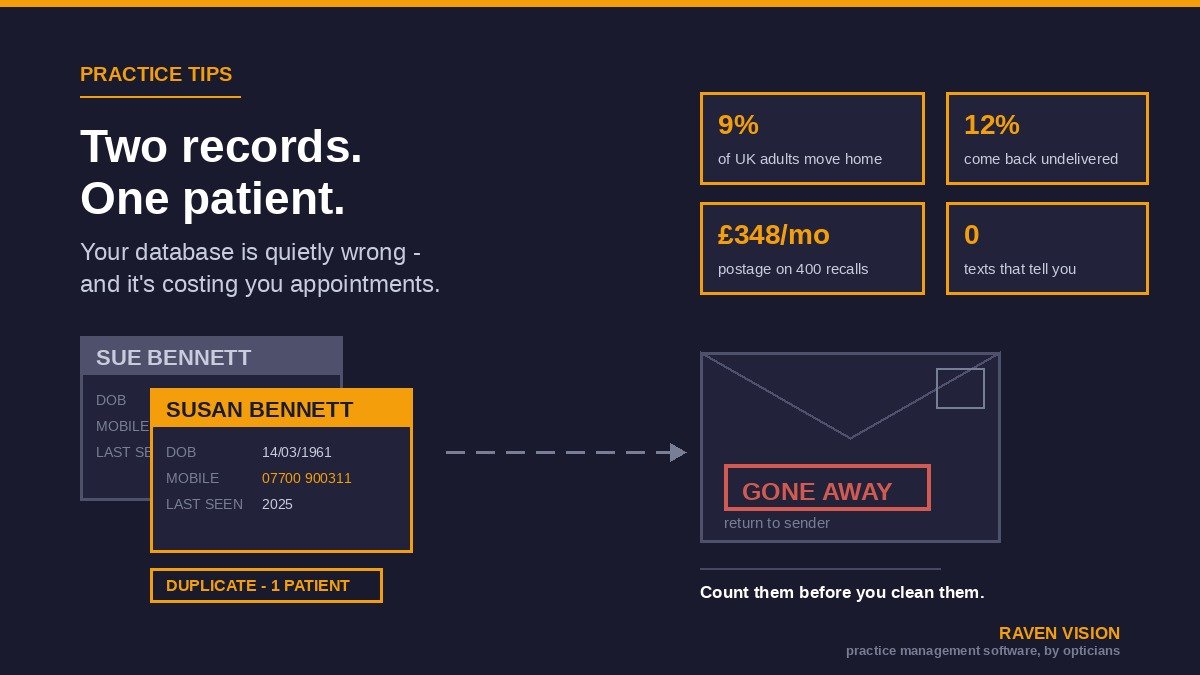

Every practice has a number it doesn’t want to look at. Not the dispense rate, not the conversion figure — the number of patients on your system you could not contact today if your life depended on it.
You already know it’s not zero. The recall letters that come back marked “no longer at this address”. The texts that fail silently. The patient who rings furious because she’s had three reminders in a fortnight, and it turns out she’s on there twice — once as Sue, once as Susan, different mobiles, different last-seen dates. The record from 2013 with no email, no mobile, and a disconnected landline.
None of this feels urgent, which is exactly why it never gets fixed. But a patient database that’s quietly wrong costs you money every month, in a way that never shows up as a line item. Here’s how to find out how bad yours is, clean it up over four weeks of small efforts, and stop it going bad again.
What bad patient data actually costs a UK independent practice
Start with the arithmetic, because it’s more brutal than most owners expect.
Around 9% of UK adults move home every year. Not marketing-list churn — actual people, actually moving. If you’ve got 6,000 patients on file and you haven’t touched their addresses since they were entered, roughly 540 of those go stale in twelve months. Royal Mail sees something like 4,000–5,000 individual address changes a day nationally. Your database doesn’t hear about a single one of them.
Now put a price on it. A practice recalling 400 patients a month by second-class post spends in the region of £348 a month in postage. If 12% are undeliverable, that’s roughly £42 posting envelopes into the void — call it £500 a year of pure waste, before the printing, the stuffing, and the twenty minutes a week someone spends on returns. SMS is far cheaper (the same 400 recalls costs around £20), but cheap doesn’t help if the mobile number is four years old and belongs to somebody else now.
The postage is the small loss. The big one is the appointment that never happens. If 500 patients on your list are unreachable and even a fifth would have booked, that’s 100 sight tests a year you’re not doing — plus the dispensing that would have followed. At a modest average transaction value you’re into five figures of lost revenue from a problem that looks like admin.
Then there’s the version that isn’t about money. A letter containing clinical information arriving at an address where someone else now lives is a personal data breach involving health data. Incidents like this are common across GP practices, dentists and community providers — they just rarely make the news. That doesn’t make them harmless.
The five ways an optician database goes wrong
Bad data isn’t one problem. It’s five, and they need different fixes.
1. Duplicates
The classic. Same human, two or three records. It happens when reception can’t find someone quickly, assumes they’re new, and creates a fresh record — usually under time pressure with a patient standing at the desk. It happens on married names, on Mohammed versus Muhammad, on a mistyped date of birth, on someone booking online with an email you don’t have on file.
The clinical risk is the real problem. Two records means half the history is in the wrong place — the optometrist opens the record with three entries and never sees the field defect noted in the one with eleven. It also wrecks your reporting: patient count inflated, recall list double-counting, “new patient” figures that are fiction.
2. Dead contact details
Addresses that have decayed, mobile numbers that have been recycled, email addresses tied to an employer the patient left in 2019, landlines nobody answers. The insidious thing is that they fail silently. An undelivered letter comes back; a text to a dead number usually just vanishes. So the patient sits on your recall list forever, marked as contacted, never responding, and you conclude they’ve gone elsewhere when actually they never heard from you.
3. Free text where structure should be
Somebody types “px prefers txt” into the notes field. Somebody else writes “no post pls” in the address line. A third person adds “DO NOT CALL — see 2022 complaint” halfway down a clinical note. All three matter, none are findable, and none will ever appear in a filter. If a preference can’t be searched on, it doesn’t exist as far as your recall run is concerned.
4. Records that should have been closed and never were
Patients who have died. Patients who moved to Aberdeen. Patients who transferred to another practice and asked for their records. These stay on the active list, get recalled, and occasionally produce the worst phone call your receptionist will take all year — a recall letter addressed to somebody’s late husband. It is entirely avoidable and it is entirely a data problem.
5. Migration scar tissue
If you’ve ever moved practice management systems, you’ve inherited whatever the old system did badly plus whatever the mapping got wrong. Dates of birth defaulted to 01/01/1900. Titles in the first-name field. Notes truncated at 255 characters. Nobody audited it at the time because the practice was busy going live, and five years on it’s just how the data looks.
The compliance angle, kept short
You don’t need a data protection lecture, but three things are worth knowing because they turn “we should tidy that up” into “we’re required to”.
The UK GDPR accuracy principle — Principle (d) — says personal data must be accurate and, where necessary, kept up to date, and that you must take every reasonable step to erase or rectify inaccurate data without delay. “We knew the address was probably wrong and posted anyway” is not a great position.
The College of Optometrists’ guidance on patient records says adult records should be kept for ten years after the patient was last seen, even if the patient has since died; for children and young people, ten years after they were last seen or until their 25th birthday, whichever is later. That’s the retention floor — and it means “closed” and “deleted” are different things. You close the record for contact purposes; you keep the clinical history.
The GOC’s Standards of Practice require you to maintain adequate patient records — adequate meaning someone else could pick them up and understand what happened and why. A record split across two duplicates isn’t adequate, however good each half is.
There’s an NHS angle too. GOS forms carry the patient’s title, names, previous surname, address, postcode, date of birth and NHS number, and mandatory fields that aren’t correctly completed get rejected and returned to you. Dirty demographics don’t only cost you recalls — they cost you claim payments and the time to resubmit. Our post on cutting GOS claim rejections covers that side.
A four-week clean-up you can actually finish
The reason database clean-ups fail is that they’re attempted as one heroic weekend. Nobody has a spare weekend. Do it in four small weeks instead, and do the measuring first — otherwise you’ll never know whether it worked.
Week one: get the four numbers
Don’t fix anything yet. Just run four counts and write them on a whiteboard in the staff room:
- Reachable by mobile. How many active patients have a mobile number in the mobile field — a real 11-digit UK mobile, not a landline typed in the wrong box?
- Reachable by email. Same test. If your last email send reported a bounce rate, note that too.
- Unreachable by anything. Patients with no valid mobile, no email, and an address that has generated a return. This is your headline number, and it’s usually the one that makes an owner sit up.
- Likely duplicates. Sort by surname and date of birth and eyeball the top of the list, or run whatever duplicate check your system offers.
Half a day, tops. If your practice reporting can’t answer those four questions without ringing your software supplier, that itself is useful information about your system.
Week two: kill the duplicates
Duplicates first, because everything else is easier once each patient is one record. Work from your likely-duplicate list. For each pair, decide which record survives — normally the one with the longer clinical history — and merge rather than delete, so no clinical entry is lost.
Two rules that will save you grief. Only one person does merges, and they do them slowly — a wrong merge is much harder to unpick than a duplicate. And if you genuinely can’t tell whether two records are the same person, don’t guess; flag it and resolve it next time either of them walks in.
An hour a day for a week clears a surprising number. Most of the duplication tends to be concentrated in recent years, since that’s when online booking started creating records.
Week three: refresh contacts where the patients are
Here’s the thing nobody wants to hear: you cannot fix contact details from behind a desk. You fix them at the point of care, from patients who are already in front of you.
So for one week, everyone who comes through the door gets asked. Not “are your details still the same?” — people say yes reflexively. Read the mobile back to them: “I’ve got you on 07700 900482, is that still right?” Read the first line of the address. Ask for an email if there isn’t one, and say why. It adds maybe twenty seconds to check-in, and a practice seeing 30 patients a day fixes 150 records a week without a single extra phone call.
For the genuinely unreachable — the ones from week one with nothing valid at all — run one last-chance mailshot with a reply slip or a short link to update details online, then mark whoever doesn’t respond as dormant. Don’t keep spending postage on them indefinitely.
Week four: close what should be closed
Go through the returns file, the “gone away” notes and anything your team has flagged over the years. Move deceased patients, patients who have transferred, and patients who have moved out of area to a closed or inactive status so they drop out of recall runs — while retaining the clinical record for the ten-year period the College sets out. If your system doesn’t have a status that does exactly this, that’s a genuine gap worth raising with your supplier.
Stopping it going bad again
A clean-up with no discipline behind it buys you about eighteen months. Four habits keep it clean.
Make the search work before you make the record. Most duplicates are created by a receptionist who couldn’t find someone in five seconds. If your system only searches on exact surname, people will keep creating new records. Search should handle partial names, phonetic near-matches, date of birth, postcode and phone number, and it should warn before saving a new patient who looks like an existing one.
Make the fields that matter mandatory and structured. Mobile number, email, contact preference, and consent for SMS and email should all be structured, searchable fields — not notes. If you want to be able to filter on it later, it cannot be free text. Our patient management pages cover how customisable fields work in practice.
Give it an owner and a slot. One named person — usually the practice manager — owns data quality, and spends thirty minutes a month on it. Duplicates flagged that month, returns processed, dormant patients closed. Thirty minutes. It’s the cheapest half hour in the practice.
Report the same four numbers every quarter. Mobile coverage, email coverage, unreachable count, duplicates found. Four numbers, one line in your management meeting. If mobile coverage is drifting down, someone has stopped asking at the desk — and you’ll catch it in a quarter rather than in three years.
What your practice management software has to do about it
Some of this is behaviour. Some of it is genuinely your system’s job, and if the system won’t help, the behaviour won’t hold.
At minimum it should give you a real duplicate check at the point of record creation, a proper merge that preserves both clinical histories, structured and mandatory demographic fields you can define yourself, searchable contact preferences and consents, a status that removes a patient from recall without deleting their record, delivery and bounce feedback on SMS and email so failures aren’t silent, and self-service reporting so you can pull those four numbers yourself in under a minute.
Ask about all seven in a demo. Ask to see the merge screen — not a slide about it, the actual screen. Ask what happens to a text that doesn’t deliver, and whether you’d ever find out. The answers separate systems built around a working practice from systems built around a feature list.
If you’re about to migrate, read this bit twice
Switching practice management systems is the single best opportunity you will ever get to clean your data — and the single easiest way to permanently entrench the mess. Whatever you migrate is what you live with.
Do the duplicate merge before the migration, not after. Agree with your new supplier exactly which fields map where, and get a sample extract to check before the full run — particularly dates of birth, address lines, and anything living in free-text notes. After go-live, spot-check fifty records against the old system by hand. It takes an afternoon and catches the mapping errors that would otherwise become permanent. More on that in our guide to switching practice management software.
The uncomfortable summary
Most independents work hard to attract new patients while quietly losing contact with the ones they already have. Acquisition is expensive and slow. Re-establishing contact with someone who already trusts you, already has a record with you and already knows where you are costs almost nothing — you just have to be able to reach them.
Run the four counts this week. That’s the whole ask. If the unreachable number is small, brilliant, you’ve lost half a day. If it’s 800 people, you’ve just found the cheapest growth opportunity in the practice, and it was sitting in your own database the whole time.
Built by people who’ve had this exact problem
Raven Vision was built inside working practices before it was sold to anyone. Our co-founder Shaukat is an optometrist with over 35 years in the profession, a former optics lecturer at the University of Manchester, and he runs three practices of his own — so duplicate records, returned recall letters and migration mess aren’t theoretical to him. They’re the reason several parts of the system work the way they do.
It’s £149 per month per location, all in — patient records, appointments, integrated eGOS, recall, stock and billing in one place, with customisable mandatory fields, structured contact preferences and self-service reporting. Free data migration is included, and we’ll flag the duplicates we find on the way in rather than quietly carrying them across. No setup fee, no lock-in.
Have a look at what’s included at £149, or book a walkthrough and bring your messiest data question with you.